
May 9, 2022 NHTSA CAMPAIGN NUMBER: 22V317000
Fisheye and Narrow Camera Views Swapped
Swapped camera views can prevent the vehicle’s cameras from detecting crossing objects and high-curvature lane lines, impairing the Autosteer and Automatic Emergency Braking (AEB) performance, and increasing the risk of a crash.
NHTSA Campaign Number: 22V317
Manufacturer Tesla, Inc.
Components FORWARD COLLISION AVOIDANCE, LANE DEPARTURE, ELECTRICAL SYSTEM
Potential Number of Units Affected 5
Summary
Tesla, Inc. (Tesla) is recalling certain 2021 Model 3 and Model Y vehicles. The fisheye and narrow camera cable terminals were incorrectly installed in the cable harness connector, resulting in swapped camera views.
Remedy
Tesla Service will correct the swapped terminals and recalibrate the cameras, free of charge. Owner notification letters were mailed July 8, 2022. Owners may contact Tesla customer service at 1-877-798-3752. Tesla’s number for this recall is SB-22-17-007.
Notes
Owners may also contact the National Highway Traffic Safety Administration Vehicle Safety Hotline at 1-888-327-4236 (TTY 1-800-424-9153), or go to www.nhtsa.gov.
Check if your Tesla has a Recall
SB-22-17-007
May 16, 2022
Swap Triple Camera Coax Cables
Condition
Certain Model 3 and Model Y vehicles were equipped with camera harnesses that were not manufactured to internal specifications, resulting in swapped views from the forward-facing fisheye and narrow view cameras. This condition causes Autopilot features to become unavailable.
Correction
Swap the positions of the triple camera coax cables on connector X890. Confirm that the camera feeds are correct, and then complete camera calibration.
Procedure
1. Move the front passenger seat fully rearward.
2. Remove the front passenger footwell cover, but do not remove the puddle light from the cover (refer to Service Manual procedure 14055402; Model 3, Model Y).
3. Model Y only:
a. Remove the front passenger floormat.
b. Remove the RH center console side panel (refer to Service Manual procedure 15196802).
c. Release the clip that attaches the car computer harness to the bracket (Figure 1), and then move the harness inboard (Figure 2).
4. Release the locking tab, and then disconnect the electrical harness (X890) from the car computer (Figures 3 and 4).
5. Model Y only: Carefully remove the tape from the electrical harness (X890) (Figure 5).
CAUTION: Take care not to damage the coax cables or the surrounding components.
6. Carefully remove the coax retaining tab (Figures 6 and 7).
TIP: Use a pick to carefully release the sides and center of the retaining tab, as indicated in Figure 6.
CAUTION: Take care not to damage the retaining tab because it will be reused.
7. Use a marker on the coax cable barrels to help remember the current position of the coax cables.
8. Remove both coax cables from the connector housing (Figure 8).
TIP: Insert a pick between the coax barrel and the connector housing to wedge the cable out of the housing.
9. Swap the positions of the coax cables (Figure 9), and then install the cables in the connector housing (Figures 10 and 11).
NOTE: Model 3 coax cables should overlap the white connector locking tab (Figure 10). Model Y coax cables should NOT overlap the white connector locking tab (Figure 11).
NOTE: The cables will lock in place with an audible “click” and should not be easily removed from the housing.
10. Install the coax retaining tab in the connector housing (Figures 12 and 13).
CAUTION: Take care not to bend the plastic tabs, and make sure the entire retaining tab is flush with the connector.
11. Connect the electrical harness (X890) on the car computer, and then engage the locking tab (Figures 3 and 4).
12. Model Y only:
a. Install the clip that attaches the car computer harness to the bracket (Figure 1).
b. Install the RH center console side panel (refer to Service Manual procedure 15196802).
c. Install the front passenger floormat.
13. Install the front passenger footwell cover (refer to Service Manual procedure 14055402; Model 3, Model Y).
14. Return the front passenger seat to its original position.
15. Connect a laptop with Toolbox 3 to the vehicle.
16. Select the Dashboards tab, search for “Service Tools”, and then select Service Tools (Figure 14).
17. Select DAS Image Capture.
18. After the image loads, review the image to confirm that the cable swap was successful (Figure 15).
NOTE: The “narrow” view should appear magnified, and the “fisheye” view should appear wide-angled.
19. Disconnect the laptop from the vehicle.
20. On the vehicle touchscreen, touch Controls > Service > Camera Calibration > Clear Calibration, and then wait for the calibration data to clear and for the calibration window to automatically close (Figure 16).
21. Drive the vehicle until camera calibration is complete and no user-facing alerts related to the Autopilot camera system are present.
NOTE: Most vehicles will finish calibration within 10 miles of driving. If Autopilot camera system alerts persist after 25 miles of driving, diagnose and repair as necessary.
TIP: Calibration completes quicker when driving on a straight road with multiple lanes (such as a controlled-access highway), with highly-visible lane markings (in the driving lane as well as the adjacent lanes).
22. After calibration completes and all Autopilot camera system alerts have cleared, activate Autopilot features to confirm proper functionality.
Chronology of Defect Determination
- In December 2020, the Fremont Factory team detected an increased rate of failed camera calibrations on Model Y vehicles in production. Production camera calibrations are conducted as part of the vehicle assembly process. Swapped camera feeds inside the camera harness were determined to be the cause, and the vehicles were corrected in production.
- From December 2020 through early February 2021, as part of follow-up efforts to ensure that camera harnesses with correctly installed terminals were used in vehicle production, camera harness inventory was screened and additional controls and tests were implemented in the supplier’s manufacturing of the harnesses.
- In February 2021, the Service Engineering team identified repairs on recently delivered vehicles that were unable to successfully complete field camera calibrations. Autopilot features, including AEB, are not available to engage unless a vehicle completes and passes field camera calibrations. An engineering investigation into the failed field camera calibrations determined the cause to be camera harnesses with swapped feeds. The engineering investigation was closed based on the corrective actions taken in prior months to screen harness inventory and implement additional controls in the supplier’s manufacturing process, coupled with Tesla’s risk assessment at the time that vehicles with the condition could not complete or pass field camera calibrations and engage Autopilot features, including AEB.
- After the engineering investigation was closed, Tesla continued to monitor the vehicle fleet, including related Service repairs. No new material information or events warranted reopening the engineering investigation until February 9, 2022, during an evaluation of new computer vision objects modeling with anonymized video clips, when some vehicles that had successfully completed field calibrations exhibited signs of swapped narrow and fisheye camera feeds, despite the previous assessment that vehicles with this condition could not complete field calibrations. Tesla reopened the engineering investigation to better understand the condition, root cause, and potential scope.
- From mid-February 2022 to mid-March 2022, Tesla designed, developed and validated an onboard diagnostic to detect the condition on a potentially affected vehicle fleet. If the condition was detected on a vehicle, an alert appeared on the user interface, and, as a precautionary measure while the investigation continued, Autopilot features, including AEB, were disabled until the condition was remedied in Service.
- Starting in mid-March 2022, Tesla began deploying the onboard diagnostic to the potentially affected vehicle fleet in waves. The deployment continued over several weeks.
- From April 11 through April 28, 2022, as part of the ongoing engineering investigation, Tesla initiated simulation testing to support a risk assessment and reviewed incoming data from the onboard diagnostic.
- On May 2, 2022, having completed the engineering investigation and risk assessment and confirmed the same root cause, a recall determination was made to remedy the vehicles identified by the onboard diagnostic with the condition.
- As of May 6, 2022, Tesla identified 4 warranty claims and 1 field report (received between April 2, 2022, and May 5, 2022) that have been received for U.S. vehicles and that are related to or may be related to vehicles with swapped camera feeds passing field calibrations. Tesla is not aware of any crashes, injuries, or deaths related to this condition.
- Between June 15 and June 16, 2022, Tesla identified one additional Model 3 vehicle that may be experiencing this condition based on its onboard diagnostic triggering an alert for this condition. After reviewing the vehicle data, Tesla concluded that the additional vehicle should be added to the recall campaign.
- On July 14, 2022, Tesla identified one additional Model 3 vehicle that may be experiencing this condition based on its onboard diagnostic recently triggering an alert for this condition. After reviewing the vehicle data, Tesla concluded that the additional vehicle should be added to the recall campaign.
July 14, 2022
2 Affected Products
10 Associated Documents
Defect Notice 573 Report
RCLRPT-22V317-5187.PDF 214.036KB
May 9, 2022 Chronology of Defect Determination
RMISC-22V317-6766.pdf 204.884KB
Recall Acknowledgement
RCAK-22V317-9645.pdf 645.274KB
Remedy Instructions and TSB
RCRIT-22V317-4389.pdf 648.656KB
Recall 573 Report-Amendment 1-06/28/2022
RCLRPT-22V317-3979.PDF 214.055KB
Chronology of Defect Determination May 9, 2022
RMISC-22V317-5595.pdf 245.475KB
ISSUED Owner Notification Letter(Part 577)
RCONL-22V317-6988.pdf 117.997KB
Recall 573 Report-Amendment 2 – 07/14/2022
RCLRPT-22V317-7162.PDF 214.064KB
Chronology of Defect Determination July 14, 2022
RMISC-22V317-6260.pdf 245.837KB
Recall Quarterly Report #1, 2022-3
RCLQRT-22V317-6342.PDF 211.13KB
Latest Recalls Documents

- [Easy to Use—Work Out of the Box] + [FOXWELL 2026 New Version] FOXWELL NT604 Elite scan tool is the 2026 new version from FOXWELL, designed for car owners who want to figure out the cause of issues before fixing car problems by scanning common systems like ABS, SRS, engine, and transmission. The NT604 Elite obd2 scanner diagnostic tool comes with the latest software—no need to waste time downloading software first. Plug the scanner into the OBDII port with OBDII cable to start the diagnosis.
- [Affordable] + [Reliable Car Health Monitor] Will you be confused what happens when the warning light of ABS/SRS/transmission/check engine flashes? Instead of taking your cars to dealership, this FOXWELL scanner will help you do a thorough scanning and detection for your cars and pinpoint the root cause. Note:The device is a diagnostic tool, not a repair tool. To turn off a warning light, you must first physically repair the issue causing it. Only then can the scanner be used to clear the corresponding fault code.
- [5 in 1 Car Diagnostic Scanner] Compared with obd scanners (50-100), NT604 Elite code scanner not only includes their OBDII diagnosis but also serves as ABS/SRS scanner, transmission and check engine code reader. When it’s an odb2 scanner, you can use it to check if your car is ready for annual test through I/M readiness menu. In addition, live data stream, built-in DTC library, data play back and print, all these features are a big plus for it. Note: doesn't support maintenance functions like reset or relearn. For the SRS system, NT604 Elite can read and clear common fault codes not caused by a crash, but crash/collision data cannot be cleared.
- [Fantastic AUTOVIN] + [No extra software fee] Through the AUTOVIN menu, this NT604 Elite car scanner allows you to get your V-IN and vehicle info rapidly, no need to take time to find your V-IN and input one by one. What's more, the NT604 Elite ABS SRS scanner supports 60+ car brands from worldwide (America/Asia/Europe). You don’t need to pay extra software fee. AUTOVIN may not work on some older vehicles or certain vehicle brands. If AUTOVIN fails, please input the vin code manually or go to the Diagnostic Menu to select your vehicle model.
- [Solid protective case KO plastic carrying bag] + [Lifetime update] Almost all same price-level car scanner diagnostic tool only offers plastic bag to hold the scanner.However, NT604 Elite automotive scanner is equipped with solid protective case, preventing your obd2 scanner from damage. Then you don’t need to pay extra money to buy a solid toolbox.

- CEL Doctor: The ANCEL AD310 is one of the best-selling OBD II scanners on the market and is recommended by Scotty Kilmer, a YouTuber and auto mechanic. It can easily determine the cause of the check engine light coming on. After repairing the vehicle's problems, it can quickly read and clear diagnostic trouble codes of emission system, read live data & hard memory data, view freeze frame, I/M monitor readiness and collect vehicle information
- Sturdy and Compact: Equipped with a 2.5 foot cable made of very thick, flexible insulation. It is important to have a sturdy scanner as it can easily fall to the ground when working in a car. The AD310 OBD2 scanner is a well-constructed mechanic tool with a sleek design. It weighs 12 ounces and measures 8.9 x 6.9 x 1.4 inches. Thanks to its compact design and light weight, transporting the device is not a problem. The buttons are clearly labelled and the screen is large and displays results clearly
- Accurate Fast and Easy to Use: The AD310 scanner can help you or your mechanic understand if your car is in good condition, provides exceptionally accurate and fast results, reads and clears engine trouble emission codes in seconds after you fixed the problem. This device will let you know immediately and fix the problem right away without any car knowledge. No need for batteries or a charger, get power directly from the OBDII Data Link Connector in your vehicle
- OBDII Protocols and Car Compatibility: Many cheap scan tools do not really support all OBD2 protocols. AD310 scanner as it can support all OBDII protocols such as KWP2000, J1850 VPW, ISO9141, J1850 PWM and CAN. This device also has extensive vehicle compatibility with 1996 US-based, 2000 EU-based and Asian cars, light trucks, SUVs, as well as newer OBD2 and CAN vehicles both domestic and foreign. Pls confirm with our customer service whether it is compatible with your vehicle before purchasing
- Home Necessity and Worthy to Own: This is an excellent code reader to travel or home with as it weighs less and it is compact in design. You can easily slide it in your backpack as you head to the garage, or put it on the dashboard, this will be a great fit for you. The AD310 is not only portable, but also accurate and fast in performance. Moreover, it covers various car brands and is suitable for people who just need a code reader to check their car
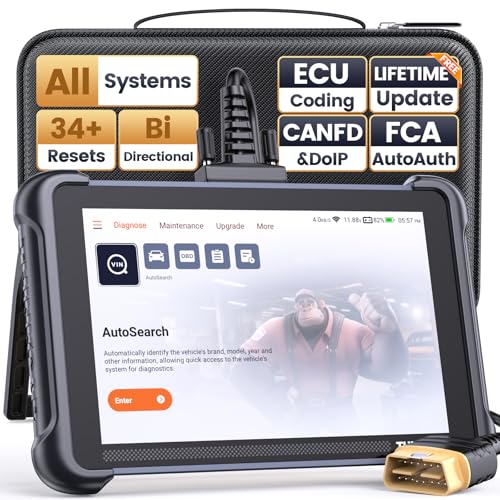
- 【Warm Tips】Dear friend, we've built this product to last, but in the unlikely event you encounter any technical hiccups, functions not support, received a used product, or just a simple question, please directly c0ntact us via Amazon Message and support @ mythinkcar. com, we're here to help and get it sorted in no time. Not sure if this product is compatible with your vehicle? Just e.mail your VIN at support @ mythinkcar. com for technical support. Note: FCA AutoAuth is a third-party service, additional cost may require.
- 【Professional Car Diagnostic Tool】Tired of renew fees? Thinkscan 689 scanner provides dealer-level advanced functions without annual fees for auto mechanics and repair shops. 34+ Services, 3000+ Active Test, ECU Coding, 140+ Brands Coverage, FCA AutoAuth, CANFD&DOIP Protocol, Component Matching, Power Balance, V.A.G Guided, Compatible with Google Chrome integration, etc. With strong hardware backing, 64G Memory, Android 10, 4-core processors, and 4150mAh battery. Thinkscan 689 brings you the best as your daily business helper and never lets you drop the ball!
- 【34+ Reset Service, Adaptation, Relearn, Calibration, Initialization, Matching】Made for workshops, Thinkscan 689 scanner provides 34+ services for worldwide vehicles: such as Gear/SAS/EPB/TPMS/D.P.F/BMS/ETS/Oil/Brake/AFS/GEARB0X/SUNROOF/SUS Reset, ABS Bleed, Injector coding, etc. Warm tips: Compatibility varies by car model, please reach out to us directly to make sure it works well on your cars.
- 【Real Active Test】Thinkscan 689 scan tool features over 3000+ full bi-directional control ability, to send commands to vehicle’s systems/components, to verify system input/output without using the vehicle's controls, e.g. turn on the radiator fan, modulate the throttle, open/close windows, operate mirrors, Injector Buz Test, turn on interior&exterior lights, sound horn, test door lock actuators, turn on/off front/rear side ACM Solenoid, Vehicle level position calibration, Wheel Speed Sensor Supply.
- 【Comprehensive Solutions with Advanced Features】Take your vehicle customization to the next level with the Thinkscan 689's advanced ECU coding capabilities. This scan tool provides power balance, PMI, unlock hidden features and enhance performance by activating dormant functions, customizing OE settings, matching replaced components, and reprogramming adaptive data to elevate your driving experience. Note: Compatibility varies by car models, please check before order.

- [All System Diagnostics, Professional-Level Scanner] - BLCKTEC 460T is the ultimate OBD2 diagnostic tool for home mechanics and professionals. It supports all 10 OBD2 modes, reads and clears Engine/Transmission/ABS/SRS codes, performs All-System Diagnostics, offers workshop reset tools, and provides real-time live data. It helps you pinpoint issues, assess your car's condition, and prepare for SMOG checks with ease. NOTE: Function availability depends on your vehicle. Before you buy, be sure to use the Compatibility Checker on BLCKTEC website or contact our customer support to verify that the features you need are supported for your vehicle’s specific year, make, and model.
- [12+ Most Popular Reset Functions] - BLCKTEC 460T OBD2 scanner offers 12+ dealer-level service functions, including Oil Maintenance Reset, ABS Bleeding, EPB Reset, SAS(Steering Angle Sensor) Recalibration, DPF(Diesel Particulate Filter) Reset, Throttle Body Relearn, Battery Reset/Initialization, TPMS Relearn, Transmission Reset, Fluid Change Reset, Maintenance Reset and more, enabling you to perform workshop services like a pro. NOTE: Function availability depends on your vehicle. Be sure to use the Compatibility Checker on BLCKTEC website to verify that the features you need are supported for your vehicle.
- [Real-Time OBD2 and OEM Live Data, Freeze Frame Data] - BLCKTEC 460T helps diagnose vehicle issues when warning lights like Check Engine Light or ABS/SRS Light appear. It offers detailed DTC info, ECU Freeze Frame Data, and real-time OBD2 and advanced OEM live data, including Engine, Transmission, ABS, SRS, and more, making it easy to diagnose and resolve vehicle problems. You can view, graph, record, replay, and overlay up to four live data streams in a single graph for better analysis.
- [AutoVIN, AutoReLink, AutoScan, 3X Faster] - Equipped with AutoVIN technology, 460T automatically retrieves the VIN to save you time. Its AutoScan and AutoReLink features scan all of the vehicle's ECUs and detect any fault codes immediately after you plug the scanner into the vehicle's OBD2 port - no button presses required. Additionally, it regathers DTC and I/M readiness information every 30 seconds, simplifying monitor tests. 460T's advanced technology makes it 3X faster than other products.
- [Get RepairSolutions2, the #1 Auto Repair App for Free] - When paired with RepairSolutions2(RS2) App, 460T becomes even more powerful. RS2's Verified Fix Database built by master technicians, provides the parts needed for the repair. Additionally, RS2 gives you access to OEM warranty info, maintenance schedules, TSB, and dealership recall info, making car care easier than ever. RS2 is free with no subscription fees and it stores your car scan reports in the cloud, allowing you to access, share, or print them anytime and anywhere.

- 【Diagnose Check Engine Light in Seconds – No Mechanic Needed】The FOXWELL NT301 OBD2 scanner instantly reads & clears engine fault codes (DTCs) with one click. Simply plug into the 16-pin DLC port, turn ignition on, and get accurate results within seconds—No prior car knowledge required. Save hundreds on dealership fees by knowing exactly what’s wrong before you visit a shop. The #1 choice car scanner for DIYers and car owners who want to take control of their vehicle’s health
- 【Clear & Reset CEL with Confidence】Unlike cheap code readers that just erase codes temporarily, NT301 works like all professional vehicle code readers: It clears the check engine light only after you’ve fixed the underlying issue. If the problem isn’t fully repaired, the fault code will reappear. So you’ll never get a false pass. Use the foxwell scanner to verify your repair work and drive with peace of mind
- 【Sm-og Check Helper – Know Your Pass/Fail Status Before the Test】With dedicated one-click I/M readiness hotkeys and a simple Red-Yellow-Green LED indicator, you’ll instantly know if your vehicle is ready for annual testing. Built-in speaker provides clear audio feedback. No guesswork—just confidence before you head to the test center. One less thing to worry about when inspection day comes
- 【Advanced OBDII Modes – O- 2 Sensor & EVAP Testing】NT301 go beyond basic code reading with enhanced OBD2 modes. Run an EVAP system check to assess fuel tank condition, and use the O- 2 sensor test to optimize air-fuel ratio, boosting fuel economy, cutting em- issions, and saving you money at the pump. The code reader for cars and trucks is like having a mini em-issions lab in your glove box
- 【Live Data Graphing – Spot Engine Issues in Real Time】View and log live sensor data in easy-to-read graphs with this OBD2 scanner diagnostic tool. Monitor ox- ygen sensors, fuel trims, coolant temperature, RPM, and more to spot suspicious values instantly. This obd scanner gives you professional-grade insight without the pro price tag—a feature you won’t find on basic $20 car code readers
SEOCONTENT-START
SB-22-17-007 Page 1 of 6 Tesla, Inc. ulletin Swap Triple Camera Coax Cables SB-22-17-007 May 16, 2022 Classification Section/Group Mobile Service Configuration Recall Bulletin Model Year Model 2021 Model 3, Model Y 17 – Electrical Country/Region United States, Europe Can Perform (where permitted) Build Location Fremont HW 3.0 The model(s) and model year(s) listed are a general approximation of the affected VIN list. Refer to the VIN/Bulletin Tracker or Customer/Vehicle profile to determine applicability of this bulletin for a particular vehicle. Recall Bulletin: Recall Bulletins are mandatory service procedures that must be carried out by Tesla-certified Service Centers. Recall work performed by uncertified technicians could lead to unsafe conditions or voided warranty provisions. Condition Certain Model 3 and Model Y vehicles were equipped with camera harnesses that were not manufactured to internal specifications, resulting in swapped views from the forward-facing fisheye and narrow view cameras. This condition causes Autopilot features to become unavailable. Correction Swap the positions of the triple camera coax cables on connector X890. Confirm that the camera feeds are correct, and then complete camera calibration. Correction Description Correction Time (Model 3) Time (Model Y) Swap Triple Camera Coax Cables on Connector X890 S012217007 0.40 0.45 Procedure 1. Move the front passenger seat fully rearward. 2. Remove the front passenger footwell cover, but do not remove the puddle light from the cover (refer to Service Manual procedure 14055402; Model 3, Model Y). 3. Model Y only: a. Remove the front passenger floormat. b. Remove the RH center console side panel (refer to Service Manual procedure 15196802). c. Release the clip that attaches the car computer harness to the bracket (Figure 1), and then move the harness inboard (Figure 2). Figure 1 Figure 2 4. Release the locking tab, and then disconnect the electrical harness (X890) from the car computer (Figures 3 and 4). Figure 3 – Model 3 Figure 4 – Model Y SB-22-17-007 Page 2 of 6 5. Model Y only: Carefully remove the tape from the electrical harness (X890) (Figure 5). CAUTION: Take care not to damage the coax cables or the surrounding components. Figure 5 6. Carefully remove the coax retaining tab (Figures 6 and 7). TIP: Use a pick to carefully release the sides and center of the retaining tab, as indicated in Figure 6. CAUTION: Take care not to damage the retaining tab because it will be reused. Figure 6 – Model 3 shown; Model Y similar Figure 7 – Model 3 shown; Model Y similar 7. Use a marker on the coax cable barrels to help remember the current position of the coax cables. 8. Remove both coax cables from the connector housing (Figure 8). TIP: Insert a pick between the coax barrel and the connector housing to wedge the cable out of the housing. Figure 8 SB-22-17-007 Page 3 of 6 9. Swap the positions of the coax cables (Figure 9), and then install the cables in the connector housing (Figures 10 and 11). NOTE: Model 3 coax cables should overlap the white connector locking tab (Figure 10). Model Y coax cables should NOT overlap the white connector locking tab (Figure 11). NOTE: The cables will lock in place with an audible “click” and should not be easily removed from the housing. Figure 9 Figure 10 – Model 3 Figure 11 – Model Y 10. Install the coax retaining tab in the connector housing (Figures 12 and 13). CAUTION: Take care not to bend the plastic tabs, and make sure the entire retaining tab is flush with the connector. Figure 12 – Model 3 Figure 13 – Model Y SB-22-17-007 Page 4 of 6 11. Connect the electrical harness (X890) on the car computer, and then engage the locking tab (Figures 3 and 4). 12. Model Y only: a. Install the clip that attaches the car computer harness to the bracket (Figure 1). b. Install the RH center console side panel (refer to Service Manual procedure 15196802). c. Install the front passenger floormat. 13. Install the front passenger footwell cover (refer to Service Manual procedure 14055402; Model 3, Model Y). 14. Return the front passenger seat to its original position. 15. Connect a laptop with Toolbox 3 to the vehicle. 16. Select the Dashboards tab, search for “Service Tools”, and then select Service Tools (Figure 14). Figure 14 17. Select DAS Image Capture. 18. After the image loads, review the image to confirm that the cable swap was successful (Figure 15). NOTE: The “narrow” view should appear magnified, and the “fisheye” view should appear wide-angled. Figure 15 19. Disconnect the laptop from the vehicle. SB-22-17-007 Page 5 of 6 SB-22-17-007 Page 6 of 6 For feedback on the accuracy of this document, email ServiceBulletinFeedback@tesla.com 20. On the vehicle touchscreen, touch Controls > Service > Camera Calibration > Clear Calibration, and then wait for the calibration data to clear and for the calibration window to automatically close (Figure 16). Figure 16 – Model 3 shown; Model Y similar 21. Drive the vehicle until camera calibration is complete and no user-facing alerts related to the Autopilot camera system are present. NOTE: Most vehicles will finish calibration within 10 miles of driving. If Autopilot camera system alerts persist after 25 miles of driving, diagnose and repair as necessary. TIP: Calibration completes quicker when driving on a straight road with multiple lanes (such as a controlled-access highway), with highly-visible lane markings (in the driving lane as well as the adjacent lanes). 22. After calibration completes and all Autopilot camera system alerts have cleared, activate Autopilot features to confirm proper functionality.
**************************************************************************************************************
13101 Tesla Road Austin, TX 78725 IMPORTANT SAFETY RECALL
**************************************************************************************************************
OMB Control No.: 2127-0004 Part 573 Safety Recall Report 22V-317 The information contained in this report was submitted pursuant to 49 CFR §573 Manufacturer Name : Submission Date : Tesla, Inc. MAY 09, 2022 NHTSA Recall No. : 22V-317 Manufacturer Recall No. : SB-22-17-007 Manufacturer Information : Manufacturer Name : Tesla, Inc. Address : 1 Tesla Road Austin TX 78725 Company phone : 6506815000 Population : Number of potentially involved : 5 Estimated percentage with defect : 100 % Vehicle Information : Vehicle 1 : 2021-2021 Tesla Model 3 Vehicle Type : Body Style : Power Train : NR Descriptive Information : The recall population includes specific Model Year (“MY”) 2021 Model 3 and Model Y vehicles. Affected vehicles were determined based on a review of vehicle log data and manufacturing records. Production Dates : NOV 29, 2020 – DEC 14, 2020 VIN Range 1 : Begin : NR End : NR Not sequential Vehicle 2 : 2021-2021 Tesla Model Y Vehicle Type : Body Style : Power Train : NR Descriptive Information : The recall population includes specific Model Year (“MY”) 2021 Model 3 and Model Y vehicles. Affected vehicles were determined based on a review of vehicle log data and manufacturing records. Production Dates : DEC 09, 2020 – JAN 15, 2021 VIN Range 1 : Begin : NR End : NR Not sequential Description of Defect : Description of the Defect : On affected vehicles, the coax cables were incorrectly manufactured in the harness assembly that connects to the forward-facing fisheye and narrow cameras, resulting in swapped camera views. FMVSS 1 : NR FMVSS 2 : NR Part 573 Safety Recall Report 22V-317 Page 2 Description of the Safety Risk : Swapped camera views between the fisheye and narrow cameras may degrade their detection of crossing objects and high-curvature lane lines, which could impair Autosteer and automatic emergency braking (AEB) performance and increase the risk of collision. Description of the Cause : During the supplier’s manufacturing of the coax cable harness, the terminals for the fisheye and narrow camera cables were incorrectly installed into the harness connector. Identification of Any Warning that can Occur : If lane departure warnings are enabled, the customer may experience a frequency of false-positive warnings. Involved Components : Component Name 1 : TRI CAMERA MCU Component Description : Camera Feed Cable from Triple Camera to MCU (Model Y) Component Part Number : 1521340-00-B Component Name 2 : ASY,CABLE,COAX,NARROW&FISHEYE,V,M3,LHD Component Description : Camera Feed Cable from Triple Camera to MCU (Model 3) Component Part Number : 1092099-00-E Supplier Identification : Component Manufacturer Name : MD Electronics Corporation Address : 26555 Evergreen Rd. Suite 1250 Southfield Michigan 48076 Country : United States Chronology : See a separate document submitted for a chronology of noncompliance determination. The information contained in this report was submitted pursuant to 49 CFR §573 Part 573 Safety Recall Report 22V-317 Page 3 The information contained in this report was submitted pursuant to 49 CFR §573 Description of Remedy : Description of Remedy Program : On affected vehicles, Tesla will correctly install the swapped terminals for the fisheye and narrow camera cables into the harness connector and recalibrate the cameras to specifications. How Remedy Component Differs from Recalled Component : Identify How/When Recall Condition was Corrected in Production : On remedied vehicles, the terminals for the fisheye and narrow camera cables are correctly installed inside the harness connector whereas, on recalled vehicles, the terminals are incorrectly installed. On or about May 19, 2022, Tesla will implement a firmware diagnostic routine in vehicle production that will confirm, after camera installation, whether the fisheye and narrow camera cable terminals are correctly installed into the harness connector. Recall Schedule : Description of Recall Schedule : All Tesla stores and service centers will be notified about this recall on or shortly after May 12, 2022. Owner notification letters will be mailed in accordance with 49 C.F.R. § 577.7. Planned Dealer Notification Date : MAY 12, 2022 – MAY 12, 2022 Planned Owner Notification Date : JUL 08, 2022 – JUL 08, 2022 * NR – Not Reported
**************************************************************************************************************
OMB Control No.: 2127-0004 Part 573 Safety Recall Report 22V-317 The information contained in this report was submitted pursuant to 49 CFR §573 Manufacturer Name : Submission Date : Tesla, Inc. JUN 28, 2022 NHTSA Recall No. : 22V-317 Manufacturer Recall No. : SB-22-17-007 Manufacturer Information : Manufacturer Name : Tesla, Inc. Address : 1 Tesla Road Austin TX 78725 Company phone : 6506815000 Population : Number of potentially involved : 6 Estimated percentage with defect : 100 % Vehicle Information : Vehicle 1 : 2020-2021 Tesla Model 3 Vehicle Type : Body Style : Power Train : NR Descriptive Information : The recall population includes specific Model Year (“MY”) 2020-2021 Model 3 and MY2021 Model Y vehicles. Affected vehicles were determined based on a review of vehicle log data and manufacturing records. Production Dates : JUN 15, 2020 – DEC 14, 2020 VIN Range 1 : Begin : NR End : NR Not sequential Vehicle 2 : 2021-2021 Tesla Model Y Vehicle Type : Body Style : Power Train : NR Descriptive Information : The recall population includes specific Model Year (“MY”) 2021 Model 3 and Model Y vehicles. Affected vehicles were determined based on a review of vehicle log data and manufacturing records. Production Dates : DEC 09, 2020 – JAN 15, 2021 VIN Range 1 : Begin : NR End : NR Not sequential Description of Defect : Description of the Defect : On affected vehicles, the coax cables were incorrectly manufactured in the harness assembly that connects to the forward-facing fisheye and narrow cameras, resulting in swapped camera views. FMVSS 1 : NR FMVSS 2 : NR Part 573 Safety Recall Report 22V-317 Page 2 Description of the Safety Risk : Swapped camera views between the fisheye and narrow cameras may degrade their detection of crossing objects and high-curvature lane lines, which could impair Autosteer and automatic emergency braking (AEB) performance and increase the risk of collision. Description of the Cause : During the supplier’s manufacturing of the coax cable harness, the terminals for the fisheye and narrow camera cables were incorrectly installed into the harness connector. Identification of Any Warning that can Occur : If lane departure warnings are enabled, the customer may experience a frequency of false-positive warnings. Involved Components : Component Name 1 : TRI CAMERA MCU Component Description : Camera Feed Cable from Triple Camera to MCU (Model Y) Component Part Number : 1521340-00-B Component Name 2 : ASY,CABLE,COAX,NARROW&FISHEYE,V,M3,LHD Component Description : Camera Feed Cable from Triple Camera to MCU (Model 3) Component Part Number : 1092099-00-E Supplier Identification : Component Manufacturer Name : MD Electronics Corporation Address : 26555 Evergreen Rd. Suite 1250 Southfield Michigan 48076 Country : United States Chronology : See a separate document submitted for a chronology of noncompliance determination. The information contained in this report was submitted pursuant to 49 CFR §573 Part 573 Safety Recall Report 22V-317 Page 3 The information contained in this report was submitted pursuant to 49 CFR §573 Description of Remedy : Description of Remedy Program : On affected vehicles, Tesla will correctly install the swapped terminals for the fisheye and narrow camera cables into the harness connector and recalibrate the cameras to specifications. How Remedy Component Differs from Recalled Component : Identify How/When Recall Condition was Corrected in Production : On remedied vehicles, the terminals for the fisheye and narrow camera cables are correctly installed inside the harness connector whereas, on recalled vehicles, the terminals are incorrectly installed. On or about May 19, 2022, Tesla will implement a firmware diagnostic routine in vehicle production that will confirm, after camera installation, whether the fisheye and narrow camera cable terminals are correctly installed into the harness connector. Recall Schedule : Description of Recall Schedule : All Tesla stores and service centers will be notified about this recall on or shortly after May 12, 2022. Owner notification letters will be mailed in accordance with 49 C.F.R. § 577.7. Planned Dealer Notification Date : MAY 12, 2022 – MAY 12, 2022 Planned Owner Notification Date : JUL 08, 2022 – JUL 08, 2022 * NR – Not Reported
SEOCONTENT-END
This product presentation was made with AAWP plugin.